Home
  • Healthcare
    • Specialties
      • Cardiovascular Care
      • Oncology
      • Neurosurgery
      • Primary Care
      • View All Specialties >
    • For Health Professionals
      • Refer a Patient
      • Clinical Trials
      • Professional Development
      • View All >
    • For Patients & Visitors
      • MyChart Login
      • Accepted Insurance
      • Pay My Bill
      • Patient Information
      • View All >
    • Clinical Trials
      • Autism
      • Cancer
      • Obesity
      • Substance Abuse
      • View All Clinical Trials >
    • Find a Doctor
    • Make an Appointment

    General Inquiries

    Call today to schedule an appointment or fill out an online request form. If requested before 2 p.m. you will receive a response today.

    CALL

    713-798-1000

    Monday – Friday 8 a.m. – 5 p.m.


    ONLINE

    Request Now

    Request non-urgent appointments

    Request an appointment, learn about your rights as a patient, read about what to expect from your appointment, and more.

    As Houston's premier academic medical practice, Baylor Medicine delivers compassionate, innovative, evidence-based care.
    Find a Doctor

  • Education
    • Degree Programs & Admissions
      • M.D. Program
      • Ph.D. Programs
      • DNP Program (Nurse Anesthesia)
      • Genetic Counseling Program
      • P.A. Program
      • Orthotics & Prosthetics Program
      • Baccalaureate/M.D. Programs
      • Dual Degree Programs
      • View All Programs >
    • Financing Your Education
      • Tuition & Fees
      • Financial Aid
      • CARES ACT
    • Schools
      • School of Medicine
      • Graduate School of Biomedical Sciences
      • National School of Tropical Medicine
      • School of Health Professions
    • Advanced Training Programs
      • Residency Programs
      • Clinical Fellowships
      • Postdoctoral Research Positions
      • Continuing Professional Development
      • Diploma in Tropical Medicine
      • View All >
    • Resources
      • Departments
      • Academic Centers
      • Academic Calendars
      • Education Cores
      • View All >
    • Information For...
      • Students
      • Postdoctoral Researchers
      • Faculty
      • Alumni
    get-to-know-houston

    America's fourth-largest city is a great place to live, work, and play. Find out why.
    Get to Know Houston

  • Research
    • Research Offices
      • Advanced Technology Cores
      • Clinical Research
      • Institute for Clinical & Translational Research
      • Office of Research Leadership
      • Research IT
      • Sponsored Programs
    • Research at Baylor
      • Academic Centers
      • Departments
      • Faculty Labs
      • From the Labs
      • News
      • Our Research
      • Research Centers
      • Strategic Research Center
    • Additional Research Services
      • BCM Innovation Institute
      • Service Labs
      • VIICTR
    get-to-know-houston

    America's fourth-largest city is a great place to live, work, and play. Find out why.
    Get to Know Houston

  • Community
    • Healthcare Outreach
      • Community Programs
      • More >
    • Global Outreach
      • Global Health
      • Global Programs >
    • Educational Outreach
      • SMART Program
      • BioEd Online
      • More >
    • General Resources
      • Community Events
      • News
      • Blogs
      • Baylor in the Community
    get-to-know-houston

    America's fourth-largest city is a great place to live, work, and play. Find out why.
    Get to Know Houston

  • About
    • About Us
      • Academic Centers
      • Alumni
      • Careers
      • Departments
      • Giving
      • Leadership
      • Mission, Vision, Values
      • News
      • Our Affiliates
      • Fast Facts
      • Accreditation
    • Offices
      • President's Office
      • Office of Research
      • Ombuds Office
      • BCM Innovation Institute
      • View All >
    • Our Campus
      • Compliance
      • Safety and Security
      • Resource Stewardship & Sustainability
      • Team Shop
      • Find a Person
    get-to-know-houston

    America's fourth-largest city is a great place to live, work, and play. Find out why.
    Get to Know Houston

  • GIVE
  • CAREERS
  • INTRANET
  • Careers
  • Contact Us
  • News
Education
  • Schools
  • Education Programs
  • Academic & Faculty Affairs
  • Tuition & Fees
  • Financial Aid
  • Registrar
  • Academic Resources
  • Office of Accreditation and Education Effectiveness
  • Education Contacts
  • News
  • School of Medicine
  • Graduate School of Biomedical Sciences
  • School of Health Professions
  • National School of Tropical Medicine
  • Cores
  • Schools
  • Education Programs
  • Academic & Faculty Affairs
  • Tuition & Fees
  • Financial Aid
  • Registrar
  • Academic Resources
  • Office of Accreditation and Education Effectiveness
  • Education Contacts
  • News
  • School of Medicine
  • Graduate School of Biomedical Sciences
  • School of Health Professions
  • National School of Tropical Medicine
  • Cores
  1. Baylor College of Medicine
  2. Education
  3. Academic & Faculty Affairs
  4. Faculty Resources
  5. Faculty Ed-Tech
  6. Learning Management Systems
  7. Blackboard
  8. Blackboard Ultra Course View
  9. Artificial Intelligence (AI) Design Assistant
  • Accessibility at BCM
  • Teaching and E-Learning Resources
  • Clinical Learning Applications
    • Aquifer
    • Osmosis
    • UpToDate
  • Digital Course Materials
  • Equipment Lending and Rental
  • Exams and Proctoring
    • ExamSoft/Examplify
      • Creating & Posting Exams
      • Creating Questions
      • Disable Operating System Auto-Update
      • Exam Stats & Analysis
      • ExamID & ExamMonitor
      • Releasing Results to Students
      • Reviewing Results
      • Scoring Exams
      • Using iPads with Examplify
    • Respondus
    • SafeAssign
  • Learning Management Systems
    • LMS Troubleshooting Solutions
      • Clearing your web browser's cache
    • Blackboard
      • Blackboard Original Course View
      • Blackboard Ultra Course View
        • Artificial Intelligence (AI) Design Assistant
        • Attendance Tracking
        • Automations
        • Beginning of Semester
        • Blackboard Ally
          • Blackboard Ally for Instructors
          • Blackboard Ally for Students
        • Blackboard Essentials
        • Blackboard Guidelines
        • Blackboard Mobile App
        • Communication
        • Course Content
          • Types of Course Content
        • Course Set Up
        • Course Size Limits
        • Discussion Boards
        • Edpuzzle
        • Forms (Formerly Bb Surveys)
        • Gradebook
        • Journals
        • LTI Tool Integration Requests
        • Organizations
        • Portfolios
        • Tests and Assignments
          • Assignment Inline Grading
          • Rubrics
          • Item Analysis
          • Anonymous, Delegated and Parallel Grading
          • Importing Test Questions via File to Ultra Course View
        • Track Student Performance
        • Users and Groups
        • Video Studio
        • Learning Object Repository
    • Comprehensive Academic Management System (CAMS)
    • Leo (DaVinci)
    • MedHub
    • SuccessFactors
    • SimulationiQ
  • Learning Spaces
    • AirMedia
    • Audio Visual Room System Design Services
      • All-in-One Huddle Room
      • Small Conference Room
      • Large Conference Room
  • Lecture Capture
  • Media Steaming
    • vBrick
  • Multimedia Creation Software
    • Adobe Creative Cloud
    • PowerPoint
    • VoiceThread
    • Articulate 360
    • O365
  • Multimedia Services
    • Professional Video Production Services
  • Online Storage
    • Box (for Education)
    • OneDrive
    • SharePoint
  • Polling and Surveys
    • Microsoft Forms
    • Poll Everywhere
    • Qualtrics
    • SmartSheets
    • Survey Monkey
  • Room Reservations
  • Virtual Classrooms
  • Virtual Collaboration
    • Microsoft Teams
  • Other Ed-Tech Apps
  • Ed-Tech News
    • BCM’s Wi-Fi & Auditorium Wired Connection Guide: Initial Connection & Basic Troubleshooting
    • Important ExamSoft: Mandatory Examplify Update - Available Soon (April 15, 2025)
    • Important: ExamSoft and New OS Compatibility
    • MFA is coming to Blackboard
    • New ExamSoft Question Types
    • Poll Everywhere Mac Presenter 4.0.0 is now available
    • SSO is coming to DaVinci Leo
    • SSO is coming to Poll Everywhere
    • SSO is coming to Up-to-Date
    • Transition from Zoom to Microsoft Teams
    • Transitioning to Blackboard Learn Ultra Courses
      • Blackboard Ultra Resources
    • Upcoming Examplify MSR Changes
    • Update: Poll Everywhere Best Practices
    • UptoDate News
    • Voice Thread Visual Redesign 2024
    • Poll Everywhere Visual Redesign 2023

Artificial Intelligence (AI) Design Assistant

Artificial intelligence (AI) is revolutionizing education, and Blackboard Ultra has a number of built-in AI tools to spark creativity and save you time. With the AI Design Assistant and the addition of AI Conversations with role-playing capabilities, instructors now have powerful tools to enhance course design, engage students, and streamline teaching tasks. Let’s explore how these AI-driven features can transform your course experience.

Key Features of the AI Design Assistant

  • Course Structure Suggestions: Generate learning modules based on your course’s title and description.
  • Context picker: Uses the course context you choose to generate content for each AI feature.
  • Discussion and Journal Generation: Create prompts to encourage class interaction.
  • Rubric and Assignment Prompt Generation: Assist in creating rubrics and assignment prompts tailored to your course.
  • Test Question and Question Bank Generation: Inspire a range of questions for assessments.
  • Image Generation: Use AI to give your course a unique look with stock or original photos.
  • Conversations: Create AI Conversations around a topic or scenario to engage your students.

TutorialVideoCourse Experience
AI Design AssistantVideoUltra
Artificial Intelligence features in UltraVideoUltra
Authentic Assessments with AI Design AssistantVideoUltra
AI Suggestions for Authentic AssessmentsVideoUltra
Design engaging Documents faster with the AI Design Assistant  Ultra
Key Facts About AI Design Assistant Ultra
Course structure suggestions - Creating ModulesVideoUltra
Discussion generation Ultra
Journal generation Ultra
Rubric generationVideoUltra
Assignment prompt generation Ultra
Test question generationVideoUltra
Question Bank generation Ultra
Insert or generate imagesVideoUltra
AI ConversationsVideoUltra
Generate Document Layouts Ultra

  • Reduce time designing a course: The use of the AI Design Assistant can provide instructors the ability to streamline and reduce portions of the course design process. This is acheived through the generation of course structure, introductory prompts, rubrics, and images.
  • Brainstorm content ideas: The AI Design Assistant provides instructors with the ability to create boilerplate content, brainstorm ideas for their content associated with assessments.
  • Safeguard intellectual property: Leveraging generative AI within Blackboard supports  instructors by ensuring intellectual property and data stays within the organization.

  • Dependency on course information: The AI Design Assistant draws insights from a course’s title, description and selected course contexts to generate content. Therefore, the quality and relevance of the generated content may depend on the information provided in these areas.
  • Content filtering: There are security filters and restrictions in place, designed to prevent users of the AI Design Assistant tool from generating harmful or offensive content. Some topics may be perceived as entered harmful or offensive, and may be flagged, or documented for up to 30 days in the OpenAI service. Instructors are advised to use these tools responsibly and report any inappropriate content they encounter.

  • AI Design Assistant Availability: The AI Design Assistant is a powerful tool available exclusively available to courses taught in Blackboard Learn Ultra Course View. The AI Design Assistant is not accessible in the Original Course View.
    • If you choose to migrate to Ultra Course View to leverage AI Design Assistant, the transition is irreversible. Once a course has been upgraded, there is no option to revert back to the Original Course View.
  • Safeguard Personal Identifiable Information (PII) Data: Only limited course information is provided to Microsoft for the Azure OpenAI service. However if any personal information is included in course titles, descriptions, and similar course information will be accessible to Azure OpenAI Service.
  • Key Facts About AI Design Assistant: Outlined on their help website, the AI Design Assistant leverages Microsoft’s Azure OpenAI Service to auto-generate outputs. This is achieved by using limited course information (e.g., course title, course description) and prompting the Azure OpenAI Service accordingly via the Azure OpenAI Service API. Instructors can include additional prompt context for more tailored output generation. Blackboard discusses other key aspects on their help website.
  • Assist the AI Design Assistant: Generative AI in its current state still needs human review and correction, therefore throughout the use of the tool, disclaimers do highlight this aspect. Instructors are therefore encouraged to use this tool as a brainstorming tool, before making adjustments.
  • Trustworthy AI Principles: Blackboard has issued their commitment to ethical AI, outlined on their site on Trustworthy AI at Anthology. Their pillars include:
    • Humans in Control: Ensuring AI serves as a tool for educators, not a replacement.
    • Fairness: Promoting equitable AI outcomes for all users.
    • Privacy and Security: Safeguarding user data and information. 

The AI Design Assistant operates under the Microsoft Responsible AI framework.  Even though course content and information are used to inform and improve the AI Design Assistant, course data remains safeguarded and stays within BCM’s protected digital space, and isn’t shared externally outside your Blackboard course environment (Data Privacy Approach | Anthology). For more information about Anthology’s AI Approach, read their Trust Worthy AI Approach, which includes the following principles:

  • humans in control
  • fairness
  • privacy
  • security, and safety

If you need help designing or creating a journal, discussion or assignment and don’t know where to start, the AI Design Assistant can guide you through the creation process. The AI Design Assistant draws insights from your course’s title and description, as well as your desired cognitive level (which is aligned with Bloom’s Taxonomy) to generate journals, discussions or assignments.

Journals can support metacognition after a learning activity or help students with reflection. Learn more about AI Generated Journals on Blackboard’s website.

Discussions are beneficial for fostering community in your classroom, improving critical thinking and communication skills, and increasing student engagement. Learn more about AI Generated Discussions on Blackboard’s website.

Assignment prompts can encourage students to engage in higher-order thinking, apply knowledge gained from your class, produce submissions that are gradable within Blackboard, or to emulate real-world situations. Learn more about AI Generated Assignments on Blackboard’s website.

You can follow the instructions below:

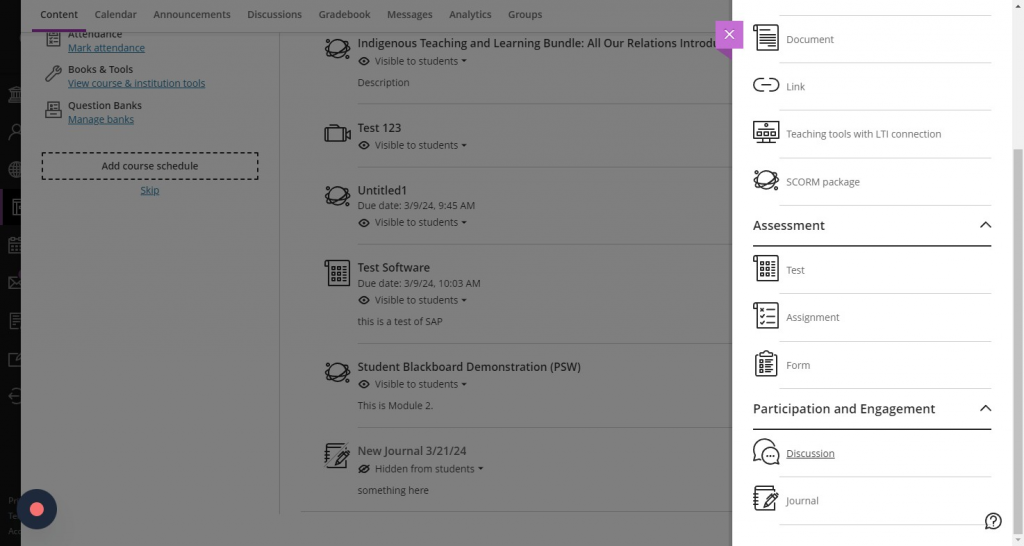
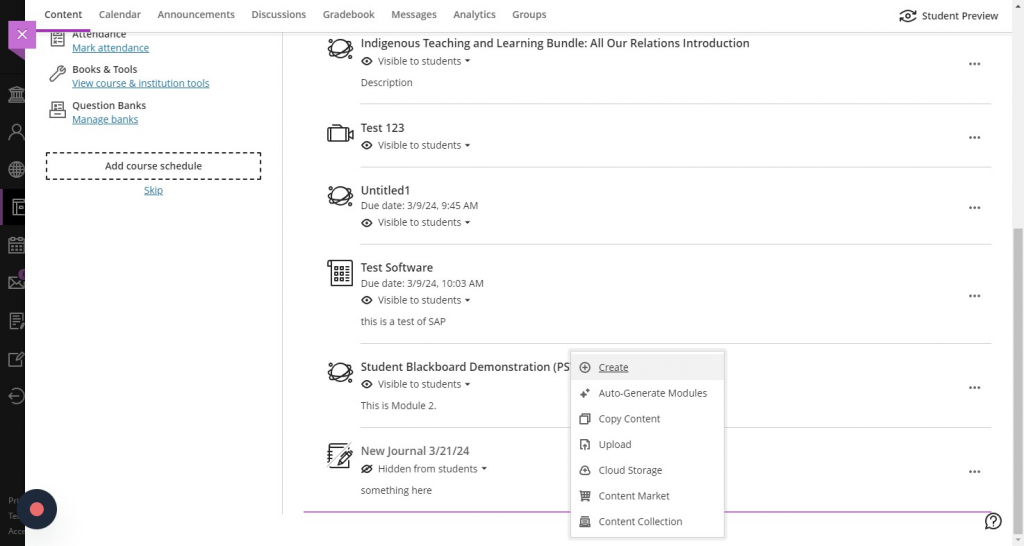
  1. Click on the purple ‘+’ icon above, between or below content items and press ‘Create’ to bring up the ‘Create Content’ menu. [view screenshot]
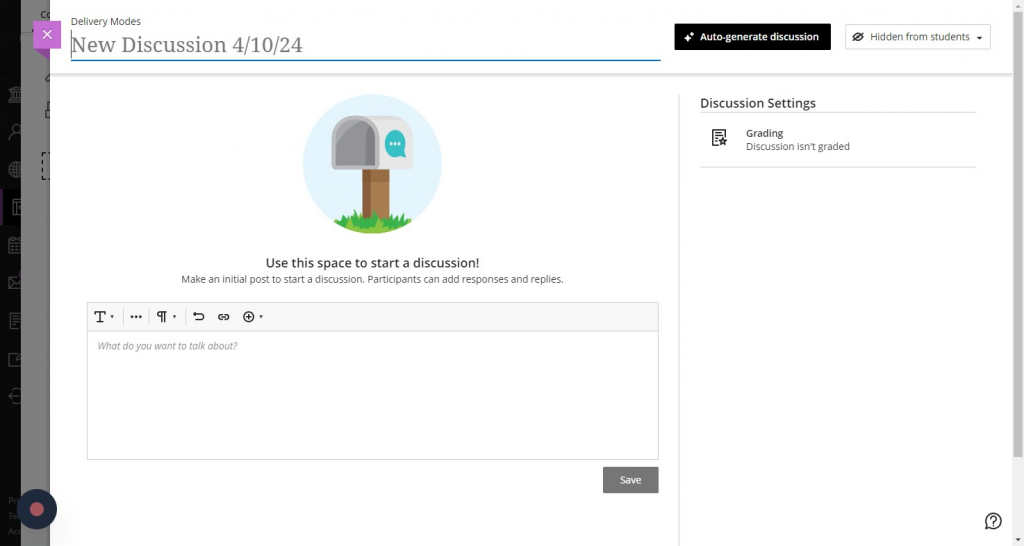
  2. Select ‘Journal’, ‘Discussion’, or ‘Assignment’ from the menu. [view screenshot]
  3. Make sure to press the ‘Auto-Generate’ button in the top right corner. [view screenshot]
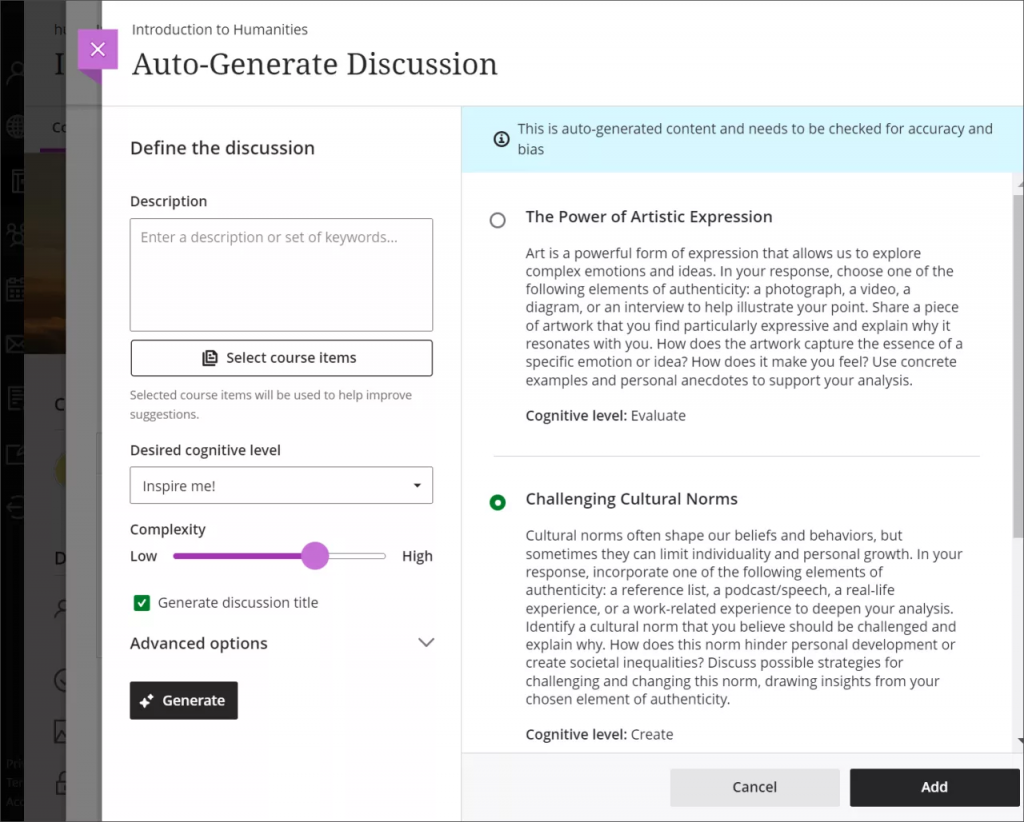
  4. Discussions, journals and assignments are automatically generated based on the title of the course, and the description included in the course. [view screenshot]
  5. You have several ways to customize the discussions, journals or assignments that the AI Design Assistant generates.
    • Enter a description (limited to 2000 characters) to narrow the focus of the discussions
      • Select the desired cognitive level
        1. Apply
        2. Analyze
        3. Evaluate
        4. Create
        5. Inspire me! provides you with a mix of levels
          1. These levels are based on Bloom’s Taxonom
      • Adjust the complexity of the discussions’ focus
        1. There are ten levels of complexity for AI-generated content.
          1. Early primary school
          2. Late primary school
          3. Early middle school
          4. Late middle school
          5. Early high school
          6. Late high school
          7. Undergraduate lower division
          8. Undergraduate upper division
          9. Graduate level
          10. Advanced PhD level
    • Select whether or not you want to generate a title for discussions
    • Select Advanced options to change the output language
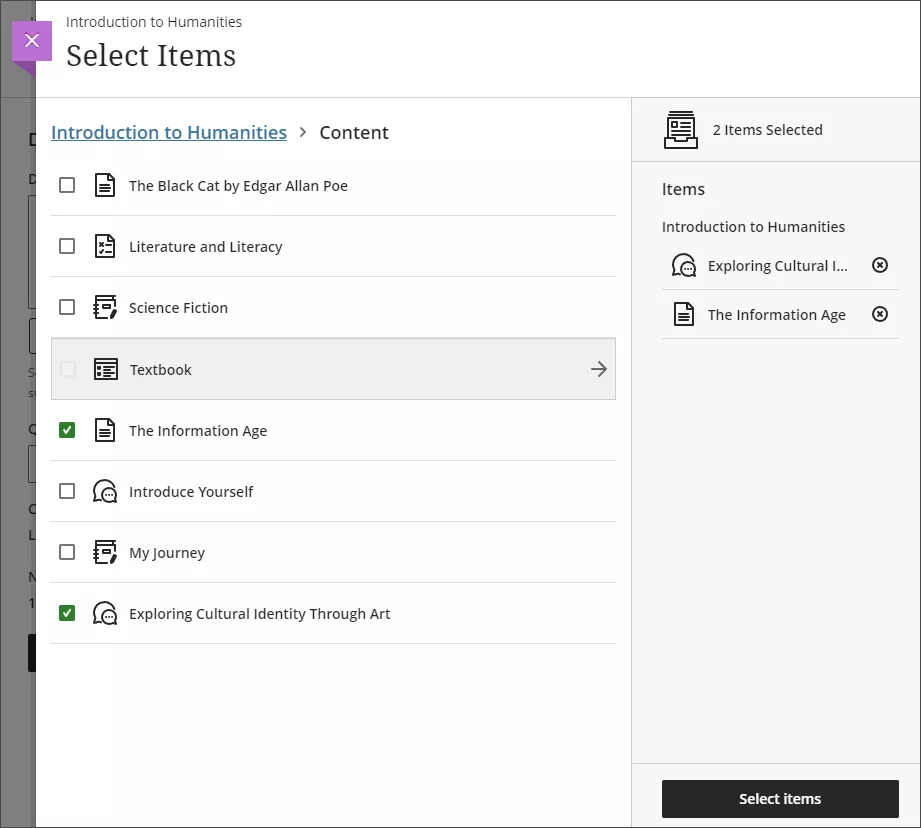
    • You can also select which course items you’d like the AI Design Assistant to provide context for discussions, journals or assignments if you’d like. Select Select course items to start. [view screenshot]
    • You can select a folder or learning module to include items from them in the generation process. When you’ve finished choosing items for context, select Select items to return to question generation.
  6. Once you’ve finalized your settings, select Generate. Review each discussion for accuracy and bias. Choose the discussion you’d like to add to your course, then select Add.
Ed-Tech
  • Accessibility at BCM
  • Teaching and E-Learning Resources
  • Clinical Learning Applications
    • Aquifer
    • Osmosis
    • UpToDate
  • Digital Course Materials
  • Equipment Lending and Rental
  • Exams and Proctoring
    • ExamSoft/Examplify
      • Creating & Posting Exams
      • Creating Questions
      • Disable Operating System Auto-Update
      • Exam Stats & Analysis
      • ExamID & ExamMonitor
      • Releasing Results to Students
      • Reviewing Results
      • Scoring Exams
      • Using iPads with Examplify
    • Respondus
    • SafeAssign
  • Learning Management Systems
    • LMS Troubleshooting Solutions
      • Clearing your web browser's cache
    • Blackboard
      • Blackboard Original Course View
      • Blackboard Ultra Course View
        • Artificial Intelligence (AI) Design Assistant
        • Attendance Tracking
        • Automations
        • Beginning of Semester
        • Blackboard Ally
          • Blackboard Ally for Instructors
          • Blackboard Ally for Students
        • Blackboard Essentials
        • Blackboard Guidelines
        • Blackboard Mobile App
        • Communication
        • Course Content
          • Types of Course Content
        • Course Set Up
        • Course Size Limits
        • Discussion Boards
        • Edpuzzle
        • Forms (Formerly Bb Surveys)
        • Gradebook
        • Journals
        • LTI Tool Integration Requests
        • Organizations
        • Portfolios
        • Tests and Assignments
          • Assignment Inline Grading
          • Rubrics
          • Item Analysis
          • Anonymous, Delegated and Parallel Grading
          • Importing Test Questions via File to Ultra Course View
        • Track Student Performance
        • Users and Groups
        • Video Studio
        • Learning Object Repository
    • Comprehensive Academic Management System (CAMS)
    • Leo (DaVinci)
    • MedHub
    • SuccessFactors
    • SimulationiQ
  • Learning Spaces
    • AirMedia
    • Audio Visual Room System Design Services
      • All-in-One Huddle Room
      • Small Conference Room
      • Large Conference Room
  • Lecture Capture
  • Media Steaming
    • vBrick
  • Multimedia Creation Software
    • Adobe Creative Cloud
    • PowerPoint
    • VoiceThread
    • Articulate 360
    • O365
  • Multimedia Services
    • Professional Video Production Services
  • Online Storage
    • Box (for Education)
    • OneDrive
    • SharePoint
  • Polling and Surveys
    • Microsoft Forms
    • Poll Everywhere
    • Qualtrics
    • SmartSheets
    • Survey Monkey
  • Room Reservations
  • Virtual Classrooms
  • Virtual Collaboration
    • Microsoft Teams
  • Other Ed-Tech Apps
  • Ed-Tech News
    • BCM’s Wi-Fi & Auditorium Wired Connection Guide: Initial Connection & Basic Troubleshooting
    • Important ExamSoft: Mandatory Examplify Update - Available Soon (April 15, 2025)
    • Important: ExamSoft and New OS Compatibility
    • MFA is coming to Blackboard
    • New ExamSoft Question Types
    • Poll Everywhere Mac Presenter 4.0.0 is now available
    • SSO is coming to DaVinci Leo
    • SSO is coming to Poll Everywhere
    • SSO is coming to Up-to-Date
    • Transition from Zoom to Microsoft Teams
    • Transitioning to Blackboard Learn Ultra Courses
      • Blackboard Ultra Resources
    • Upcoming Examplify MSR Changes
    • Update: Poll Everywhere Best Practices
    • UptoDate News
    • Voice Thread Visual Redesign 2024
    • Poll Everywhere Visual Redesign 2023

Contact Ed-Tech

Email ed-tech@bcm.edu
get-to-know-houston

America's fourth largest city is a great place to live, work and play. Find out why.
Get to Know Houston

Credit
Visit Houston

Follow Us facebook twitter youtube linkedin instagram rss 

Footer Menu Healthcare

  • Healthcare
    • Specialties
    • MyChart Login
    • For Patients & Visitors
    • For Health Professionals
    • Clinical Trials
    • Find a Physician

Footer Menu Education

  • Education
    • Programs & Admissions
    • Student & Trainee Resources
    • Faculty Resources
    • School of Medicine
    • Graduate School of Biomedical Sciences
    • National School of Tropical Medicine
    • School of Health Professions
    • Tuition & Fees
    • Financial Aid

Footer Menu Research

  • Research
    • Our Research
    • Core Labs
    • Faculty Labs
    • Research Centers
    • Research Offices

Footer Menu Community

  • Community
    • Healthcare Outreach
    • Education Outreach
    • Global Programs
    • Community Events

Footer Menu About

  • About
    • Our Campus
    • Departments
    • Academic Centers
    • Administrative Offices
    • Affiliates
    • Leadership
    • Giving
    • Alumni

Footer Menu Resource Links

  • Resource Links
    • Contact Us
    • Find a Person
    • Careers
    • BCM Team Shop
    • News
    • Title IX Office
    • Compliance
    • Covid Response Site

©1998-2026 Baylor College of Medicine® | 1 Baylor Plaza, Houston, Texas 77030 | 713-798-4951
Have an edit or suggestion for this page?

  • Compliance
  • Privacy
  • Intranet