Home
  • Healthcare
    • Specialties
      • Cardiovascular Care
      • Oncology
      • Neurosurgery
      • Primary Care
      • View All Specialties >
    • For Health Professionals
      • Refer a Patient
      • Clinical Trials
      • Professional Development
      • View All >
    • For Patients & Visitors
      • MyChart Login
      • Accepted Insurance
      • Pay My Bill
      • Patient Information
      • View All >
    • Clinical Trials
      • Autism
      • Cancer
      • Obesity
      • Substance Abuse
      • View All Clinical Trials >
    • Find a Doctor
    • Make an Appointment

    General Inquiries

    Call today to schedule an appointment or fill out an online request form. If requested before 2 p.m. you will receive a response today.

    CALL

    713-798-1000

    Monday – Friday 8 a.m. – 5 p.m.


    ONLINE

    Request Now

    Request non-urgent appointments

    Request an appointment, learn about your rights as a patient, read about what to expect from your appointment, and more.

    As Houston's premier academic medical practice, Baylor Medicine delivers compassionate, innovative, evidence-based care.
    Find a Doctor

  • Education
    • Degree Programs & Admissions
      • M.D. Program
      • Ph.D. Programs
      • DNP Program (Nurse Anesthesia)
      • Genetic Counseling Program
      • P.A. Program
      • Orthotics & Prosthetics Program
      • Baccalaureate/M.D. Programs
      • Dual Degree Programs
      • View All Programs >
    • Financing Your Education
      • Tuition & Fees
      • Financial Aid
      • CARES ACT
    • Schools
      • School of Medicine
      • Graduate School of Biomedical Sciences
      • National School of Tropical Medicine
      • School of Health Professions
    • Advanced Training Programs
      • Residency Programs
      • Clinical Fellowships
      • Postdoctoral Research Positions
      • Continuing Professional Development
      • Diploma in Tropical Medicine
      • View All >
    • Resources
      • Departments
      • Academic Centers
      • Academic Calendars
      • Education Cores
      • View All >
    • Information For...
      • Students
      • Postdoctoral Researchers
      • Faculty
      • Alumni
    get-to-know-houston

    America's fourth-largest city is a great place to live, work, and play. Find out why.
    Get to Know Houston

  • Research
    • Research Offices
      • Advanced Technology Cores
      • Clinical Research
      • Institute for Clinical & Translational Research
      • Office of Research Leadership
      • Research IT
      • Sponsored Programs
    • Research at Baylor
      • Academic Centers
      • Departments
      • Faculty Labs
      • From the Labs
      • News
      • Our Research
      • Research Centers
      • Strategic Research Center
    • Additional Research Services
      • BCM Innovation Institute
      • Service Labs
      • VIICTR
    get-to-know-houston

    America's fourth-largest city is a great place to live, work, and play. Find out why.
    Get to Know Houston

  • Community
    • Healthcare Outreach
      • Community Programs
      • More >
    • Global Outreach
      • Global Health
      • Global Programs >
    • Educational Outreach
      • SMART Program
      • BioEd Online
      • More >
    • General Resources
      • Community Events
      • News
      • Blogs
      • Baylor in the Community
    get-to-know-houston

    America's fourth-largest city is a great place to live, work, and play. Find out why.
    Get to Know Houston

  • About
    • About Us
      • Academic Centers
      • Alumni
      • Careers
      • Departments
      • Giving
      • Leadership
      • Mission, Vision, Values
      • News
      • Our Affiliates
      • Fast Facts
      • Accreditation
    • Offices
      • President's Office
      • Office of Research
      • Ombuds Office
      • BCM Innovation Institute
      • View All >
    • Our Campus
      • Compliance
      • Safety and Security
      • Resource Stewardship & Sustainability
      • Team Shop
      • Find a Person
    get-to-know-houston

    America's fourth-largest city is a great place to live, work, and play. Find out why.
    Get to Know Houston

  • GIVE
  • CAREERS
  • INTRANET
  • Careers
  • Contact Us
  • News
Education
  • Schools
  • Education Programs
  • Academic & Faculty Affairs
  • Tuition & Fees
  • Financial Aid
  • Registrar
  • Academic Resources
  • Office of Accreditation and Education Effectiveness
  • Education Contacts
  • News
  • School of Medicine
  • Graduate School of Biomedical Sciences
  • School of Health Professions
  • National School of Tropical Medicine
  • Cores
  • Schools
  • Education Programs
  • Academic & Faculty Affairs
  • Tuition & Fees
  • Financial Aid
  • Registrar
  • Academic Resources
  • Office of Accreditation and Education Effectiveness
  • Education Contacts
  • News
  • School of Medicine
  • Graduate School of Biomedical Sciences
  • School of Health Professions
  • National School of Tropical Medicine
  • Cores
  1. Baylor College of Medicine
  2. Education
  3. Academic & Faculty Affairs
  4. Student and Trainee Resources
  5. Student/Trainee Tech Resources
  6. Blackboard for Students
  7. Blackboard Grades
  • Blackboard Content Editor
  • Blackboard Essentials for Students
  • Blackboard Grades
  • Blackboard Portfolios
  • Blackboard Test and Quiz Best Practices
  • Respondus LockDown Browser (Student Guide)

Blackboard Grades

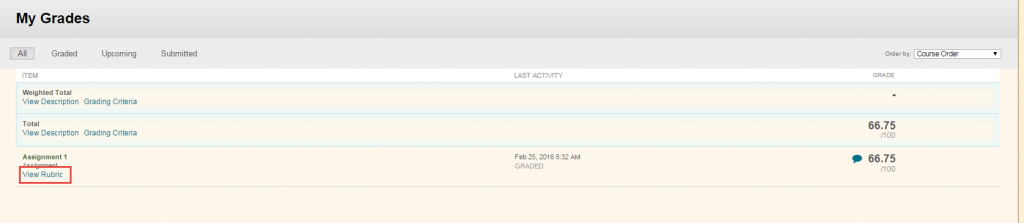
The Grades page shows the status of gradable items, such as tests, assignments, journal and blog entries, and discussion posts. The Grades page may include item names and descriptions, due dates, student and instructor dates of activity, posted grades, points possible, links to rubrics used for grading, and your instructor's comments and feedback.

For more information about Grades, select from the following:

Your grades can appear in multiple places. Wherever you find your grade, you'll find the information you need.

  • On your course's Grades page inside the relevant course
  • In your activity stream
  • On your global Grades page, accessed from the list where your name appears

For complete istructions on how to access Grades, visit the Blackboard Help Center

  • To See All Grades (Global View)
    • From the main Blackboard landing page, select the Grades icon in the left-hand menu.
    • This page lists all courses, organized alphabetically, showing overall grades and due dates.
  • To See Grades for a Specific Course
    • Enter the course and select the Grades icon from the course's navigation bar.
  • To View Item-Specific Details (Assignments & Tests)
    • In the course gradebook, find the graded item and click the grade itself or the item's title.
    • For Assignments: Click Your Grade or View Submission to see feedback, annotations, and rubrics.
    • For Tests: Select the grade to see answers, question feedback, and instructor comments (if available).
    • Feedback Icon: A speech bubble icon next to a grade means feedback is present; click it to read comments. 

For complete istructions on how to access Grades, visit the Blackboard Help Center

For information on how to view grades and feedback for Assignments, please visit Blackboard Assignments.

For Blackboard tests and quizzes the majority of questions are automatically graded. Your instructor defines the correct answers and assigns a certain number of points to each question when the test is created. The system validates your answers against the key and assigns the score. You may see your score immediately after completing the test or when your instructor releases this information.

Essay questions, file response, and short answer questions are not auto-graded. Your instructor must grade these questions manually. If a test contains these question types, the grade for the test is released when your instructor chooses.

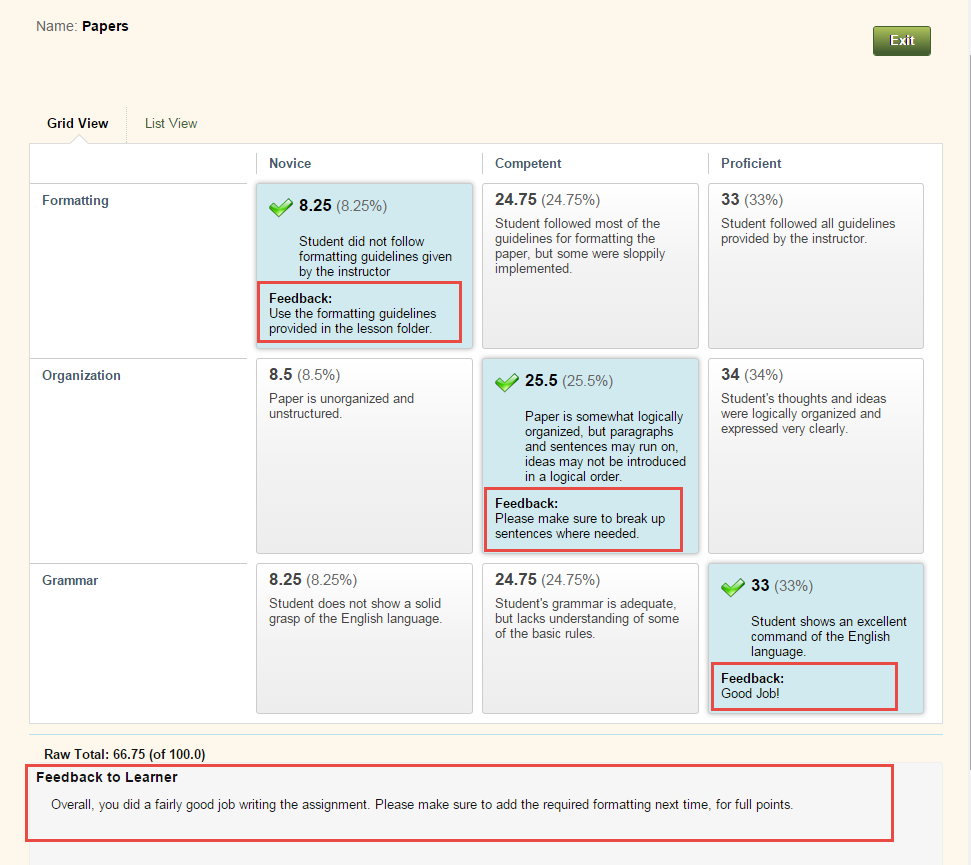
If your instructor has associated a rubric with an essay, file response, or short answer question and made it available, View Rubric [view screenshot] appears next to the Save Answer function. Click View Rubric to review the criteria your instructor has chosen.  Green check marks will indicate where you received your points. Instructor’s feedback for you can be in two places: Feedback and Feedback to Learner. [view screenshot]
The performance results you receive after completing a test depend on the options selected by your instructor. For example, your instructor may only show the final score for one test, while for another test the final score and correct answers are displayed. Feedback includes one or more of the following:

  • Final score for the test
  • Test questions
  • Answers submitted
  • Correct answers
  • Feedback for the questions

To access feedback and grade information, select the test in the content area or use My Grades. On the View Attempts page, click the grade link (underlined score or letter grade) in the Calculated Grade column to access the test, your answers, and any instructor feedback.

If your instructor used a rubric for grading an essay, file response, or short answer test question and made it available, click View Rubric while viewing the graded test to display detailed information.

Ed-Tech
  • Blackboard Content Editor
  • Blackboard Essentials for Students
  • Blackboard Grades
  • Blackboard Portfolios
  • Blackboard Test and Quiz Best Practices
  • Respondus LockDown Browser (Student Guide)

Contact Education Technology Staff

Email ed-tech@bcm.edu

Office of Education Affairs

One Baylor Plaza Room 430A Houston, TX 77030
get-to-know-houston

America's fourth largest city is a great place to live, work and play. Find out why.
Get to Know Houston

Credit
Visit Houston

Follow Us facebook twitter youtube linkedin instagram rss 

Footer Menu Healthcare

  • Healthcare
    • Specialties
    • MyChart Login
    • For Patients & Visitors
    • For Health Professionals
    • Clinical Trials
    • Find a Physician

Footer Menu Education

  • Education
    • Programs & Admissions
    • Student & Trainee Resources
    • Faculty Resources
    • School of Medicine
    • Graduate School of Biomedical Sciences
    • National School of Tropical Medicine
    • School of Health Professions
    • Tuition & Fees
    • Financial Aid

Footer Menu Research

  • Research
    • Our Research
    • Core Labs
    • Faculty Labs
    • Research Centers
    • Research Offices

Footer Menu Community

  • Community
    • Healthcare Outreach
    • Education Outreach
    • Global Programs
    • Community Events

Footer Menu About

  • About
    • Our Campus
    • Departments
    • Academic Centers
    • Administrative Offices
    • Affiliates
    • Leadership
    • Giving
    • Alumni

Footer Menu Resource Links

  • Resource Links
    • Contact Us
    • Find a Person
    • Careers
    • BCM Team Shop
    • News
    • Title IX Office
    • Compliance
    • Covid Response Site

©1998-2026 Baylor College of Medicine® | 1 Baylor Plaza, Houston, Texas 77030 | 713-798-4951
Have an edit or suggestion for this page?

  • Compliance
  • Privacy
  • Intranet